 FeatherLaunch
A Minecraft launcher for older PCs
FeatherLaunch runs Minecraft: Java Edition with mods and modpacks from Modrinth, and stays out of the game's way: about 50 MB of memory and almost no CPU while it waits. Free, for Windows and Linux.
Download for Windows Linux and other options
Version 0.1.0 · 6.7 MB · no installer
What it does
- Instances
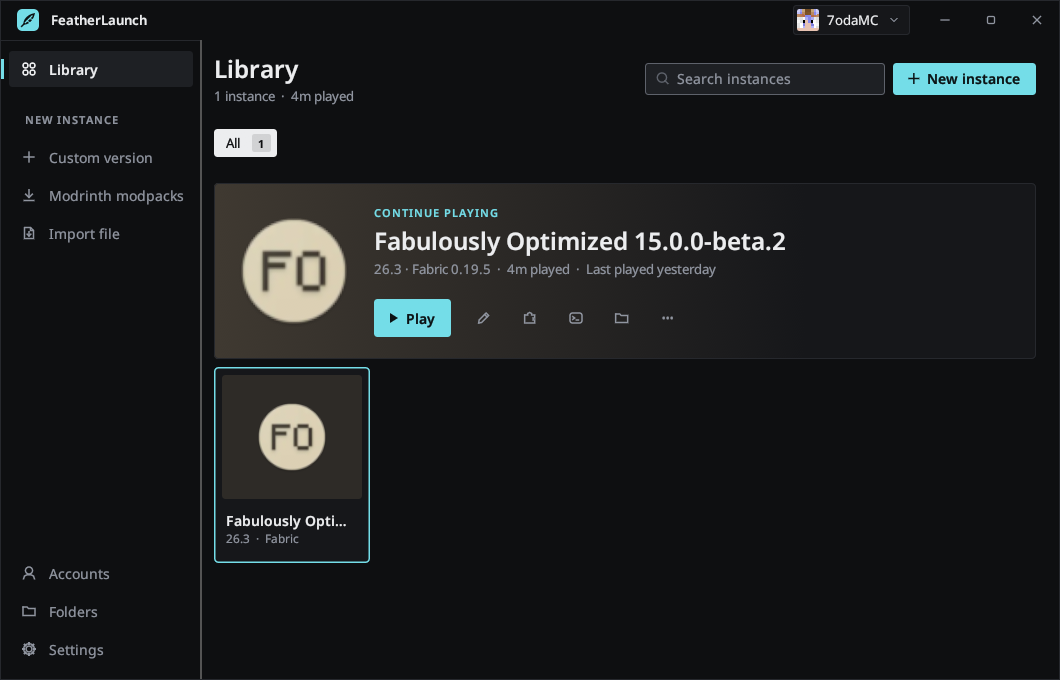
- Separate game folders, each with its own Minecraft version, memory, Java and icon. Group them, search, duplicate, and see your play time.
- Mod loaders
- Fabric, Quilt, Forge and NeoForge are installed for you. Vanilla works too.
- Modrinth
- Search mods, resource packs and shaders. Required dependencies install with them, and updates are one click.
- Modpacks
- Install a Modrinth modpack from inside the launcher, or import a
.mrpackfile. - Microsoft sign-in
- Sign in once and stay signed in. Your skin shows in the launcher, and you can change it there.
- Java
- The right Java for each Minecraft version is found on your PC or downloaded automatically.
- Game log
- Live log with a filter, a stop button and the latest crash report, on the instance page.
- Portable
- One file, no installer. Put an empty
portable.txtnext to it to keep everything in one folder, for example on a USB stick.
Mods, with names and icons
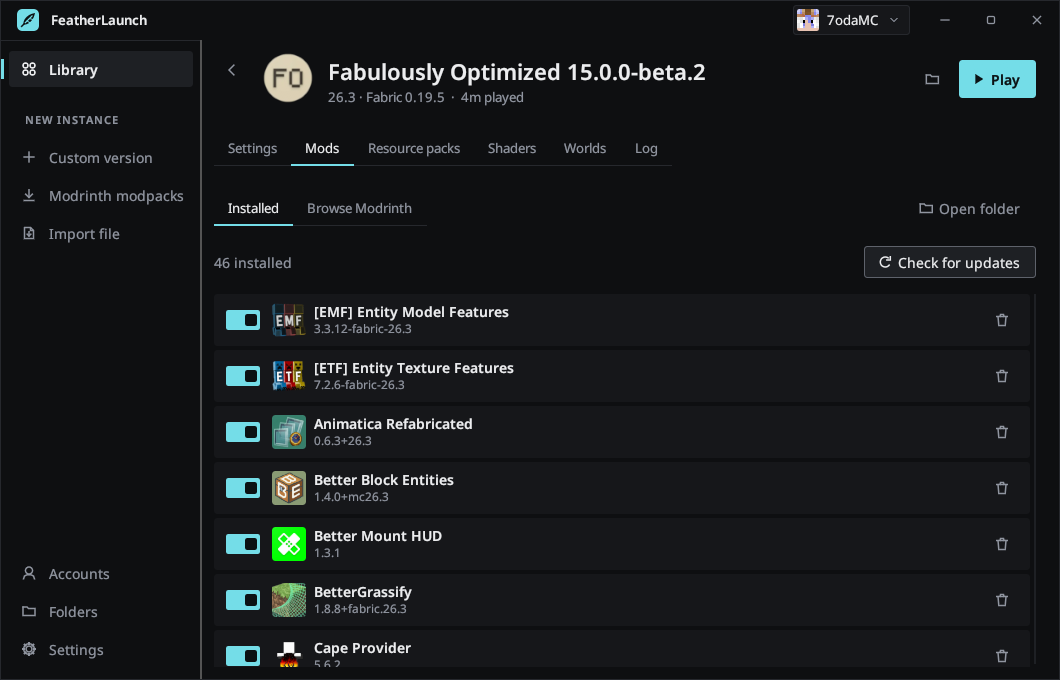
Each instance has a page for its settings, mods, resource packs, shaders, worlds and log. Mods show their real names and icons, even ones you copied in by hand, and you can switch one off without deleting it.
Why it's light
Measured on Windows with an Intel Core i7-4790S and Intel HD 4600 graphics:
| Memory | about 50 MB |
|---|---|
| CPU while idle | near 0% |
| Download | 6.7 MB on Windows, 6.3 MB on Linux |
It only redraws when something changes, uses OpenGL that old integrated graphics handle, and shares game files between instances so nothing downloads twice. While you play, it minimizes itself, and its default Java settings are tuned for slower CPUs.
Download
Version 0.1.0. You need a Microsoft account that owns Minecraft: Java Edition. Once it has signed in, you can also play offline.
Windows
Windows 10 or 11, 64-bit.
Run it from any folder. The program isn't code-signed yet, so Windows may show a SmartScreen warning: choose More info, then Run anyway.
Linux
64-bit, glibc 2.35 or newer (Ubuntu 22.04, Fedora 36, Debian 12 and later), X11 or Wayland.
featherlaunch-linux-x64.tar.gz
Extract it anywhere and run featherlaunch/featherlaunch. It adds itself
to your app menu. To stay signed in it needs a keyring such as GNOME Keyring or KWallet.
SHA-256 checksums: SHA256SUMS.txt · All releases
Sign-in and privacy
You sign in on Microsoft's own website with a short code, so FeatherLaunch never sees your password. Minecraft only lets reviewed apps use its sign-in, and FeatherLaunch passed Mojang's review for access to the Minecraft services API. Your sign-in is kept in Windows Credential Manager or your Linux keyring. The launcher has no servers, accounts, analytics or telemetry; it only talks to Microsoft, Mojang, Modrinth and the Java and mod loader download sites. Read the privacy policy.
Help
Questions, bugs or something not working: email support@mahmoudalnakeeb.com.
For a bug, please include your Windows or Linux version, what you were doing, and the file
launcher.log from the launcher's data folder (in the launcher: Settings, then the
folder button). The log holds error messages only, no passwords or sign-in tokens.
Support development
FeatherLaunch is free and will stay free. Donating unlocks nothing and is never expected, but if you'd like to help, this is where the money goes:
- A Windows code-signing certificate. It costs over a hundred dollars a year, and it's what stops Windows from warning people about the download.
- Old PCs to test on. The launcher is built for hardware most developers no longer have, and it can only be tested properly on the real thing.
- Time for fixes, Windows and Linux testing, and new features.